
Before creating Zoom Live Class or Live Meeting you must have Zoom account and Zoom API credentials. If you don’t have zoom account or API credentials then check this video tutorial.
To configure Zoom Live Class, go to Zoom Live Classes > Settings, here enter Zoom API Key, Zoom API Secret details and check Teacher API Credential and Zoom Client App Enable/Disable and then click on Save button.
Here, entered API credential is known as Global API Key so we will recommend using zoom paid plan API credentials otherwise use the free plan you can run only single class or meeting with limitation set up zoom.
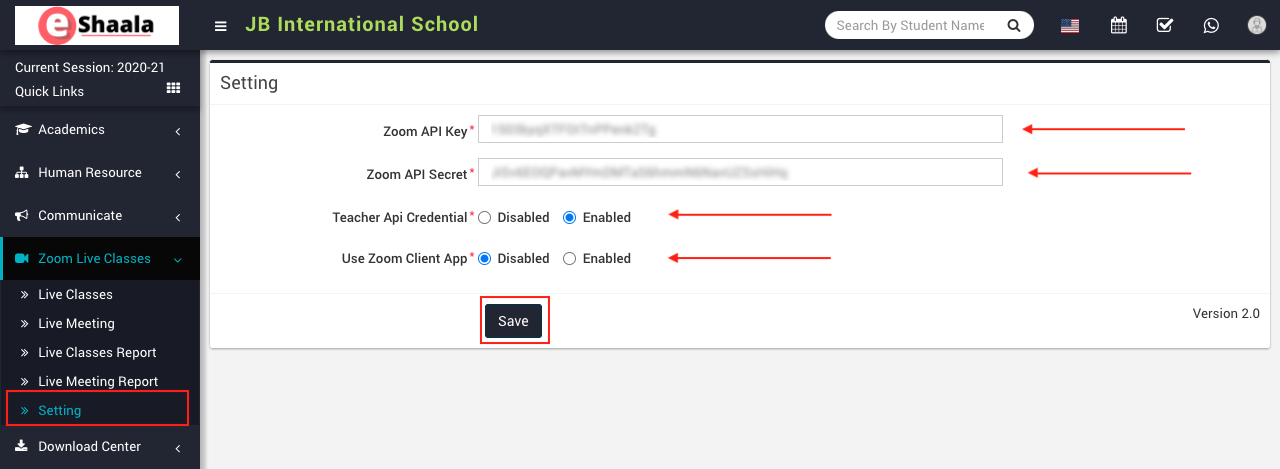
If you disable Teacher API Credential option then the teacher will have to use the global API key and will not be able to create their own API Credential and if you enable Teacher API Credential option then the teacher can add their own API credentials from their teacher account by clicking on Add Credential button to create Live class by using self-generated API Key from their zoom account
If you enable Zoom Client App option then the user will have to install Zoom Client App on their device and if you disable Zoom Client App option then user does not have to install anything, Classes and Meeting will start on Zoom Web SDK.
Note: Zoom Web SDK is NOT as mature as Zoom Client App so maybe some features will not work properly or missing in Zoom Web SDK so it is highly recommended to use Zoom Client App to avoid Zoom Web SDK issues and use full-featured Zoom services.
NOTE:
- If you are getting “Invalid access token” error message while creating Zoom Live Class or Meeting that means you are using incorrect API credential for your Zoom account so check your API credential you have entered.
 English
 Hindi
Hindi Marathi